


 It's a straight forward yet comprehensive spam filter for Outlook combining Bayesian filtering with smart white lists and works with all accounts...
Heinz Tschabitscher, E-mail Expert
 I'm very pleased with Spam Reader - it does a better job than built-in Outlook junk mail filter. I receive much spam and your product is a big help for me.
David Solomon, IT World Legend
The product is performing exceptionally well. The last update enhanced great features. Thanks for making a product that ably does what its creators say it will do.
Armand A. La Bes
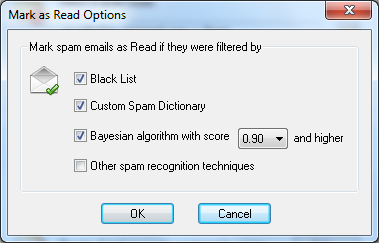
By default, all incoming spam messages are directed to spam folder and marked as unread. In order to help users to easy distinguish 100% spam from "not sure" spam emails Spam Reader allows to mark "as Read" only those spam messages which were filtered by particular, trusted algorithms. You can customize the list of trusted algorithms on General tab of program options.

 Free Version
